Slow hosting leaks revenue. Every extra second your site needs to load costs you clicks, leads, and orders, and we didn’t want to be the host causing that.
Instead of repeating “we’re fast” like every other provider, we put our hosting platform to the test.
Real benchmarks, not generic promises
Most hosts show you hardware logos. We’d rather show you numbers you can check.
WordPress performance test. On a fresh WordPress install hosted on GOZEN’s WordPress Hosting platform, our internal benchmark ran a full suite of tests:
- CPU & memory operations
- Filesystem write and IO speed
- Database read/write and complex queries
- Persistent object cache
- WordPress core operations & hooks
- Network throughput
The result: an overall server performance score of 9.4/10, with 100% ratings across the main resource categories.
For context: The industry average for shared hosting benchmarks is around 4–6/10. Most budget hosts score below 7/10 on the same test suite.

In simple terms: the stack responds immediately, doesn’t choke under CPU-heavy tasks, and handles database operations the way high-traffic sites need.


Want these scores on your site? See WordPress Hosting plans →
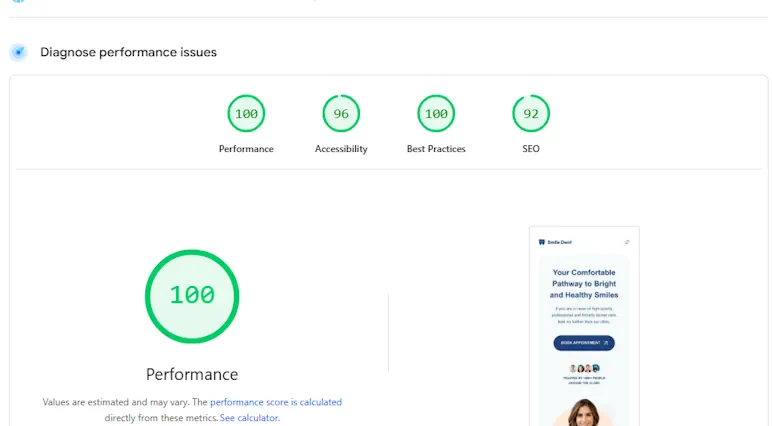
Joomla Lighthouse test. On our Joomla demo site, Google PageSpeed Insights reported:
- Desktop performance: 100 / 100
- Mobile performance: 99 / 100
- First Contentful Paint: as low as 0.3–1.1 s
- Largest Contentful Paint: 0.5–2.1 s
- Total Blocking Time: 0 ms
- Cumulative Layout Shift: essentially zero
Industry comparison: According to HTTP Archive, the median Lighthouse performance score for websites globally is around 50/100 on mobile. Scores above 90 put you in the top 5% of all sites.
These are the same metrics Google uses for Core Web Vitals. When those are green, your users (and Google) are happy.


Benchmarks conducted: November 2025 on standard shared hosting plans. We applied no custom tuning, so these are out-of-the-box results.
What’s under the hood of the GOZEN Super Speed Platform
None of this is magic. It comes down to hardware choices and a lot of configuration work.
1. Modern hardware, tuned for hosting
- High-frequency CPU cores suitable for PHP & database workloads
- NVMe Gen 4 storage for low-latency reads/writes
- Generous RAM allocations so your site doesn’t constantly hit disk
Outcome: faster PHP execution, snappier database queries, more consistent response times. See our GoZen Hosting Stack overview for the full technical breakdown.
2. Optimized web server stack
We build our stack around high-performance web servers and PHP workers explicitly configured for WordPress, Joomla, and other PHP-based CMS:
- HTTP/2 and HTTP/3 support for better parallel loading
- Keep-alive and connection reuse
- Limits that protect the node without strangling your site
In practice that means more requests served in parallel and fewer slowdowns during traffic spikes. Our KB article on LiteSpeed vs Nginx vs Apache explains why we chose this stack.
3. Application-aware caching
Static caching alone isn’t enough. We combine:
- Full-page caching for anonymous visitors
- Object caching for database-heavy operations
- Browser caching policies for repeat visits
- CMS-aware rules so logged-in users and carts still behave correctly
Outcome: your CMS feels “static-site fast” without breaking functionality. For implementation details, see our WordPress Speed Optimization playbook.
4. Database tuned for real workloads
Instead of using a generic database config, we tune:
- Buffer pools & query cache for CMS-style queries
- Connection limits to prevent noisy neighbors from flooding the server
- Slow query logging to catch and fix bottlenecks early
Queries return faster, and the server stays steadier under load.
5. Network & DNS with low latency in mind
- Premium upstreams with strong peering across our global datacenter network
- Optimized routing for EU & US traffic
- Fast DNS so the browser can actually start connecting quickly
All of this keeps the time until your visitor sees the first byte as low as we can get it. Check our network infrastructure or test latency yourself with our Looking Glass.
Why this speed matters for your business
In business terms, the benchmarks translate to this:
Higher conversion rates. Faster pages reduce friction. Visitors stay, read, and buy rather than bounce. A Google study found that a 1-second delay in mobile load time can reduce conversions by up to 20%.
Better SEO & Core Web Vitals. Google rewards fast, stable sites. Solid LCP, FCP, and CLS scores help your ranking potential.
Stronger mobile performance. With mobile PageSpeed in the high 90s and 0 ms blocking time, your site remains usable on real-world phones and connections.
More capacity from the same plan. Efficient hardware and caching mean you can handle more traffic before you even think about scaling up.
WordPress, Joomla or something else? It doesn’t matter – the platform is fast.
Whether you’re running:
- A WooCommerce shop on WordPress
- A corporate site or portal on Joomla
- A content-heavy blog or magazine
- A custom PHP app for agencies or developers
…the underlying GOZEN Super Speed Platform is built to give all of them the same fast, consistent response times.
You don’t need to be a performance engineer. You deploy your site, and we handle the stack.
How to get these results on your own site
Choose the right plan. Start with our optimized WordPress Hosting or CMS-ready Shared Hosting plans. They use the same stack as the benchmarks above.
Use recommended cache & optimization plugins. We’ll provide a short checklist (page cache, image optimization, critical CSS, etc.) so you hit top scores without guesswork.
Let us review your setup. Our team can review your current configuration and suggest quick wins, from PHP version upgrades to database indexing. Contact us for a free performance review.
Monitor with the same tools. Use Google PageSpeed Insights and your preferred WordPress/Joomla benchmark plugin to validate the performance yourself, so you aren’t taking our word for it.
Ready to see your scores jump?
If your current host struggles to break out of the “orange zone” on Google PageSpeed, that’s usually the infrastructure, not something you’re stuck with.
Our Super Speed Platform has already hit these numbers:
- 9.4/10 in WordPress server benchmarks
- 100/100 desktop and 99/100 mobile performance on Joomla
- 0 ms Total Blocking Time
- ~0 Cumulative Layout Shift
Your site can run on exactly the same stack.
Check our Hosting Plans today! All plans include NVMe storage, LiteSpeed, and our full caching stack. 45-day money-back guarantee.
Frequently Asked Questions
How is server performance measured?
Server benchmark scores test CPU operations, memory speed, filesystem I/O, database queries, object caching, and WordPress core hooks. A score of 9.4/10 means the server performs at or near maximum capacity across all categories. Most budget hosting scores 4–6/10 on the same tests.
What is a good Google Lighthouse score?
A Lighthouse score above 90 is considered “good” by Google. Scores of 100/100 (desktop) and 99/100 (mobile), which is what we achieved, place your site in the top 1% of all websites globally. This directly impacts your Core Web Vitals and SEO ranking.
Are these benchmarks on shared or dedicated hosting?
All benchmarks were conducted on our standard shared hosting plans with no custom tuning. So every customer on our platform gets the same underlying performance, and the test environment got no special treatment.
Does hosting speed really affect SEO?
Yes. Google has confirmed that page speed is a ranking factor, particularly through Core Web Vitals (LCP, FID/INP, CLS). Sites with consistently fast TTFB and low blocking time typically earn better crawl budgets and rank higher in search results.
Can I test GOZEN’s speed myself?
Yes. Sign up for any hosting plan, deploy your site, and run Google PageSpeed Insights or GTmetrix. You can also test our network latency directly via our Looking Glass tool. We back it with a 45-day money-back guarantee, so you aren’t risking anything.
Fast hosting that stays affordable as you grow.
NVMe Gen 4 storage, LiteSpeed, 99.9% uptime SLA. Starting at $3.49/mo.
Dorian K. writes about hosting infrastructure, performance, and migrations at GOZEN HOST LLC, a Top 25 WordPress Hosting Provider for 2026 (HostAdvice).
Last updated: Mar 13, 2026